

Updated October 2025
If you’re not showing in the local 3-pack, chances are your Google Business Profile (GBP) has a few silent killers. In this guide we’ll fix the most common Google Business Profile mistakes that quietly kill your local visibility. in Kilmarnock, Ayrshire, Glasgow and exactly how to correct them so you win more calls and enquiries.
Need a hand? Our Google Business Profile optimisation service fixes these issues fast and sets a simple monthly rhythm that compounds results.

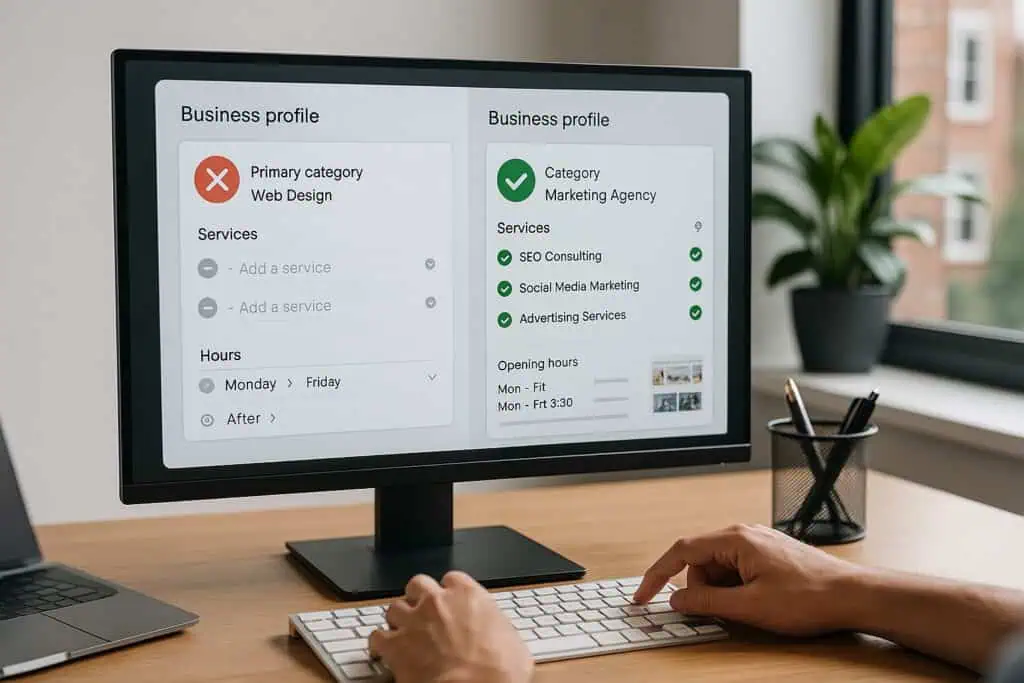
1) Choosing the wrong primary category
Your primary category is one of the strongest relevance signals. If it doesn’t match buyer intent, you won’t appear for the searches that matter.
Fix: Pick the most specific primary category customers actually type (e.g., Roofing Contractor, Accountant, Italian Restaurant). Add 2–4 relevant secondary categories no padding.
Related: See our ultimate optimisation guide for a full category checklist.
2) Incomplete profile (thin services, missing hours)
Half-filled profiles look untrustworthy and underperform.
Fix: Complete every field you can: hours (incl. holiday hours), phone, website, Services with 40–80 word descriptions and optional prices, attributes (e.g., wheelchair access, appointment required), and booking links if applicable.
Improve your local 3-pack visibility with ongoing GBP management small weekly actions beat sporadic sprints.
3) Keyword-stuffing the business name
Adding keywords to your business name is against Google’s guidelines and risks suspension.
Fix: Use your real-world business name exactly as it appears on signage and your website. Put keywords in Services, Posts, and page content not the name.
4) Storefront vs Service Area set up incorrectly
If you visit customers at their location, you’re a Service Area Business (SAB). Showing a false address or setting both incorrectly harms visibility (and risks suspension).
Fix:
- Storefront: show your address; set service areas if relevant.
- SAB: hide your address; set service areas; ensure NAP consistency on your site.
5) Inconsistent NAP across the web
Mismatched Name, Address, Phone across your website, GBP and directories confuses Google and dilutes trust.
Fix: Lock one Name–Phone–URL format and reuse it everywhere (website, GBP, Bing Places, Apple Business Connect, Yell, Thomson Local, Scoot, 192.com, Facebook, LinkedIn). Update changes in GBP first, then mirror.
6) Ignoring reviews or replying slowly
Reviews drive prominence and conversions. A trickle of fresh, genuine reviews beats occasional bursts.
Fix:
- Ask after every successful job (email/SMS with your short review link).
- Reply within 48 hours to every review. Thank happy customers; handle negatives calmly and offer a solution (never argue).
Deep dive: How to generate fantastic GBP customer reviews
7) No Google Posts, photos or short videos
Dormant profiles fall behind. Stock imagery doesn’t persuade.
Fix: Weekly Posts (tip/offer/case study) and monthly photos/10–20s clips of real work, people, and results. You don’t need EXIF geotagging—use clear captions and nearby text (e.g., “Flat roof repair in Glasgow”).
8) Linking GBP to a weak or generic page
Sending clicks to a homepage that doesn’t match intent hurts conversions (and indirectly, rankings).
Fix: Point GBP’s Website field to a high-converting local service page: service + location H1, proof above the fold, benefits, testimonials, simple Book Consultation CTA, matching NAP, and internal links to relevant guides.
Helpful guide: GBP overview on getting to the top of search.
9) Duplicate or legacy listings
Duplicates split ranking signals; old addresses linger.
Fix: Audit for duplicates. Keep the correct listing, merge or remove the rest. If suspended, fix eligibility/address issues and appeal with evidence (signage, utilities, invoices).
10) Weak tracking and no monthly routine
If you don’t measure, you can’t improve.
Fix:
- Review GBP Insights monthly: Calls, Directions, Website clicks, top queries.
- Keep a 30-minute/month routine: one Post, a few photos, request reviews, check Insights, adjust.
- Use light automation (reminders via Make.com/Calendar).
Common Google Business Profile Mistakes (and Fixes)
A) Mistake-by-mistake fix checklists
1) Wrong primary category – Diagnose & fix
- Diagnose: Compare your primary with the top 3 competitors showing in the 3-pack for your best term.
- Fix: Set one precise primary; keep 2–4 relevant secondaries. Re-check quarterly.
2) Incomplete profile
- Diagnose: Missing Services, attributes, holiday hours, or booking link.
- Fix: Complete every field; add Services with 40–80 word descriptions and optional price/price range.
3) Keyword-stuffed business name
- Diagnose: Listing name doesn’t match signage/website.
- Fix: Use your real-world name only; move keywords to Services, Posts and page copy.
4) Storefront vs Service Area set wrong
- Diagnose: You travel to customers but show a street address.
- Fix: Switch to Service Area Business, hide address, set service areas; match this on your site.
5) Inconsistent NAP
- Diagnose: Name/phone/URL differ across GBP, website, Bing, Apple, Yell, etc.
- Fix: Lock a single Name–Phone–URL format and update the top UK directories.
6) Reviews ignored / slow replies
- Diagnose: Few recent reviews; replies take >48h.
- Fix: Ask after every job (email/SMS short link). Reply within 48h to all reviews.
7) No Posts/photos/short videos
- Diagnose: Last Post >30 days; mostly stock photos.
- Fix: Weekly Post + monthly photos/10–20s clips of real work; use clear captions.
8) Weak website landing page
- Diagnose: GBP links to homepage with no proof or CTA.
- Fix: Link to a local service page with service+area H1, proof above the fold, benefits, testimonials, clear Book Consultation CTA.
9) Duplicate/legacy listings
- Diagnose: Old addresses or multiple entries in Maps.
- Fix: Keep the correct listing; merge/remove the rest; appeal suspensions with evidence.
10) No tracking/routine
- Diagnose: You can’t quote Calls/Directions/Website clicks from Insights.
- Fix: 30-minute monthly routine (Post, photos, review requests, check Insights, adjust).
B) 30-minute monthly maintenance plan
- Week 1 (10 min): One Update Post with CTA.
- Week 2 (10 min): Add 3–5 photos or a 10–20s vertical clip.
- Week 3 (5 min): Request reviews; reply to all reviews.
- Week 4 (5 min): Review Calls / Directions / Website clicks + top queries; adjust next month’s Post/photo.
Quarterly: sanity-check categories, services, hours, attributes.
C) UK citations you shouldn’t ignore (short block)
Consistency across trusted directories reinforces your entity. Prioritise: Bing Places, Apple Business Connect, Yell, Thomson Local, Scoot, 192.com, Facebook Page, LinkedIn Company Page, Yelp UK—using the exact same business name, phone and homepage URL as your GBP.
Quick recovery checklist
- Correct primary + secondary categories.
- Complete Services with short, helpful descriptions.
- Add weekly Posts and monthly photos/short videos.
- Request and respond to reviews within 48 hours.
- Point GBP to a strong local landing page.
- Fix NAP across key UK directories.
- Merge/remove duplicates.
- Track Calls / Directions / Website clicks and act monthly.
Prefer the done-for-you route? Our Google Business Profile optimisation service handles setup and weekly momentum so you stay visible in Kilmarnock, Ayrshire and Glasgow.
Bonus Mistake: Not Verified or Recently Suspended
If your profile isn’t verified—or was suspended—you won’t rank at all.
Fix: Complete verification, then review Google’s policies on eligibility, categories, and address rules. For suspensions, correct the issue and submit an appeal with evidence (signage photos, invoices, utility bill, Companies House info).
Bonus Mistake: Service Areas Set Incorrectly
Service Area Businesses often pick too many locations or leave a storefront address visible by mistake.
Fix: Hide your address if you don’t serve customers at your location, list realistic service areas, and mirror the setup on your website (footer NAP + “Areas we serve” section).
Bonus Mistake: No Tracking on the Website Link
Without UTM tags you can’t see how many visits your GBP is sending.
Fix: Use a UTM-tagged URL in your GBP Website field (e.g., ?utm_source=google&utm_medium=organic&utm_campaign=gbp). Track conversions in Analytics and GBP Insights, then optimise the landing page.
Conclusion
Most underperforming profiles suffer from a few fixable mistakes. Correct the setup, add a steady cadence of posts/photos/reviews, and connect to a focused landing page. Do that, and you’ll see more map visibility, calls, and consultations without relying on ads.
Next steps:
- Fix the reasons your GBP isn’t ranking
- Follow the full optimisation checklist
- Or talk to us about our GBP Optimisation Service
What’s the most damaging GBP mistake?
A mismatched primary category. It prevents you appearing for high-intent searches. Fix that first, then complete Services, reviews and photos.
Should I include keywords in my business name?
No. It violates Google’s guidelines and risks suspension. Use real-world name only; place keywords in Services, Posts and page content.
Do weekly Posts really help rankings?
They help engagement and conversions and contribute to freshness signals. Consistent Posts + reviews + photos = stronger prominence.
My profile still isn’t ranking—what now?
Check proximity, categories, NAP, reviews/photos cadence and landing page quality. Then work through 5 key reasons your GBP isn’t ranking
For full rules, see the official Google Business Profile guidelines on Google’s Help Centre.